
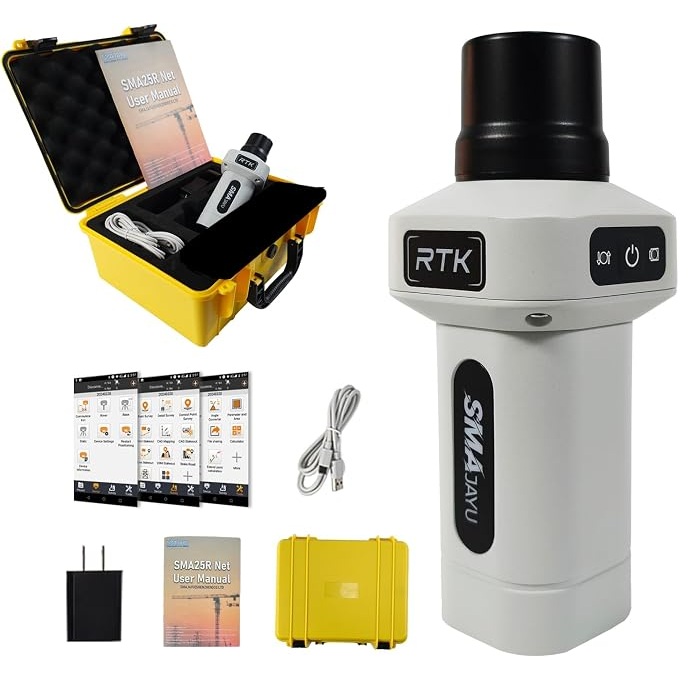
A handheld RTK receiver with built-in battery and antenna, which reaches centimeters with GPS TrackMaker right out of the box and is the most expensive of the models we tested
The SMA25R Net, from SMAJAYU, is a handheld RTK GNSS receiver, made to go on a pole. The battery and the antenna sit inside the same housing, and it connects to the phone over Bluetooth. It works as a rover with GPS TrackMaker for Android and iPhone, from version 2.0 on.
Click Approved GNSS Receivers to find out where to buy.
On our bench it was one of the simplest receivers to use. We turned it on, connected, and it reached RTK FIXED. It was also the most expensive one we tested. This page tells what the SMA25R Net delivers with GPS TrackMaker, what it does not do and who the purchase makes sense for.
New to the subject? Start with the article RTK in GPS TrackMaker: from meter-level GPS to centimeter accuracy, which explains what RTK is, where the correction comes from and what you need to use it.
Note: TrackMaker does not sell, represent or provide any warranty for the SMA25R Net. What is here is what we observed on our unit, with the factory firmware, between September and November 2026.
The short version, for those in a hurry
| Question | Answer |
|---|---|
| Does it work with GPS TrackMaker? | Yes, as a rover, over Bluetooth, on Android and on iPhone. |
| Does it reach RTK FIXED? | Yes. On our unit, with a reported accuracy of 1.5 to 2.5 cm horizontally. |
| Does it work out of the box? | Yes. It needed no firmware, activation code or cable. |
| Can it be a base station? | No. The device does not deliver the base correction, and the manufacturer confirmed that it is rover only. |
| Does it work without internet? | Yes, with satellite PPP. Accuracy is at the decimeter level, not centimeters, and takes about an hour to settle. |
| Does the tilt sensor work in GPS TrackMaker? | Not so far, but this feature is planned for future versions of GPS TrackMaker. |
| Is it worth the price? | It is a good product. To use with GPS TrackMaker, however, there are much cheaper models that reach the same order of accuracy. |
| Who is it for? | For those who want a finished device, with battery and case, and accept paying for it. |
What the SMA25R Net is
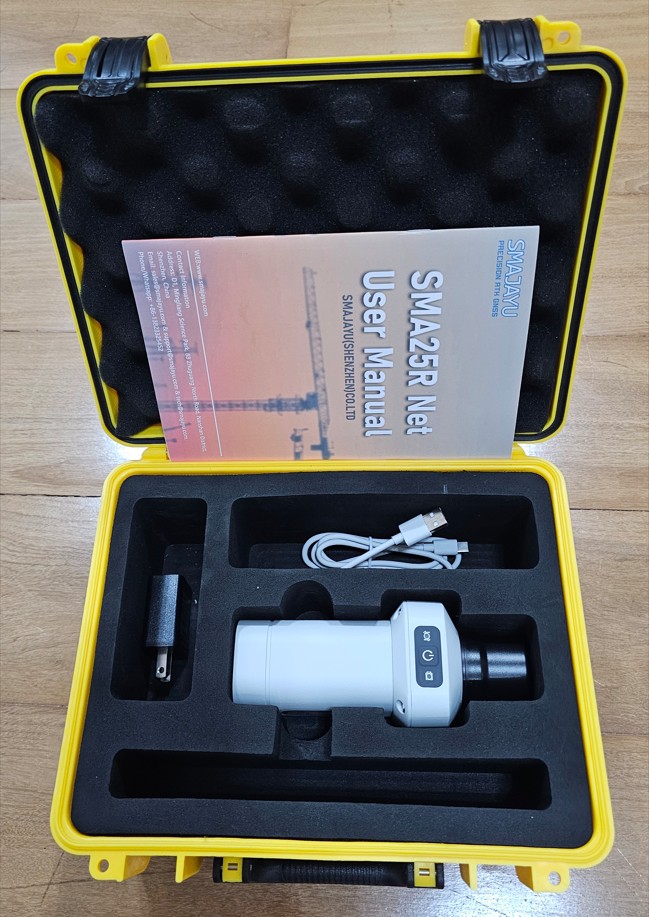
The SMA25R Net has the shape of a surveying receiver. It is a cylinder 16.5 cm tall weighing 550 g, with the pole thread at the bottom. Inside it are the GNSS engine, the antenna, the Bluetooth, a tilt sensor and the battery. There are no wires, no power bank and no antenna to screw on.
It comes in a rigid yellow plastic case lined with foam, in the style of professional equipment. Inside are the receiver, the manual, the USB-C cable and the charger. It was the best presented receiver among those we tested.
The price includes a surveying app from the manufacturer, unlocked with an activation code. To use it with GPS TrackMaker, neither the app nor the code is needed. The receiver sends its data and accepts corrections from GPS TrackMaker without any activation.
| Feature | Value (manufacturer’s listing) |
|---|---|
| Constellations | GPS, GLONASS, Galileo, BeiDou and QZSS, on 16 frequencies and 1408 channels |
| Advertised accuracy | 2.5 cm with corrections over the internet (CORS) and 10 cm with PPP |
| Tilt | Internal sensor, to measure with the pole tilted up to 60° |
| Bluetooth | 4.0, for Android. Our unit also has Bluetooth LE, which the listing does not mention. |
| Battery | 4800 mAh, for 16 hours of use or more. Charging through the USB-C port, including from a power bank. |
| Size and weight | 165 mm tall by 70 mm, 0.55 kg |
| Protection | IP54 (dust and splashes) and drops of up to 2 m |
What the listing calls CORS is the correction received over the internet, from a network of stations. In GPS TrackMaker, it is Online Correction. The listing mentions only Android, but the receiver also works on iPhone, as we show below.
Inside
We opened our unit to find out what is inside. The GNSS engine is a Unicore UM980, with 1408 channels, which receives all constellations on several bands.
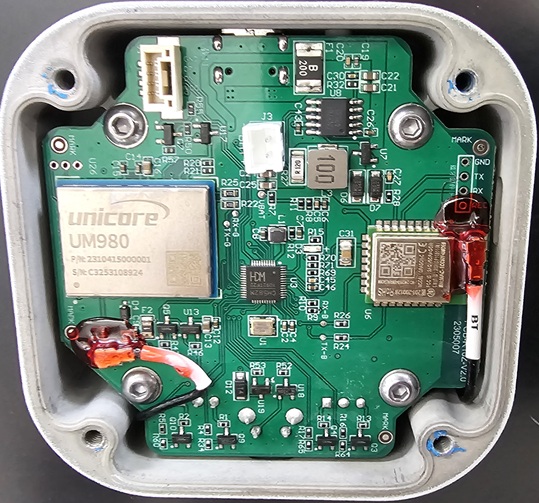
Between the UM980 and the Bluetooth module there is a microcontroller. Everything the receiver sends to the phone goes through it, and it explains the two limits we found. The base station correction does not leave the device, and the tilt-corrected position does not reach the app.
The build is good. The board is well assembled and screwed into an aluminum housing, and the antenna cables are locked with glue.
Everything indicates that the device is made by AllyNav and sold under the SMAJAYU brand. The board carries the marking PCB-R10Z, and R10 is the name of an AllyNav receiver.
Our experience, in the order it happened
The purchase. We bought it on Amazon.
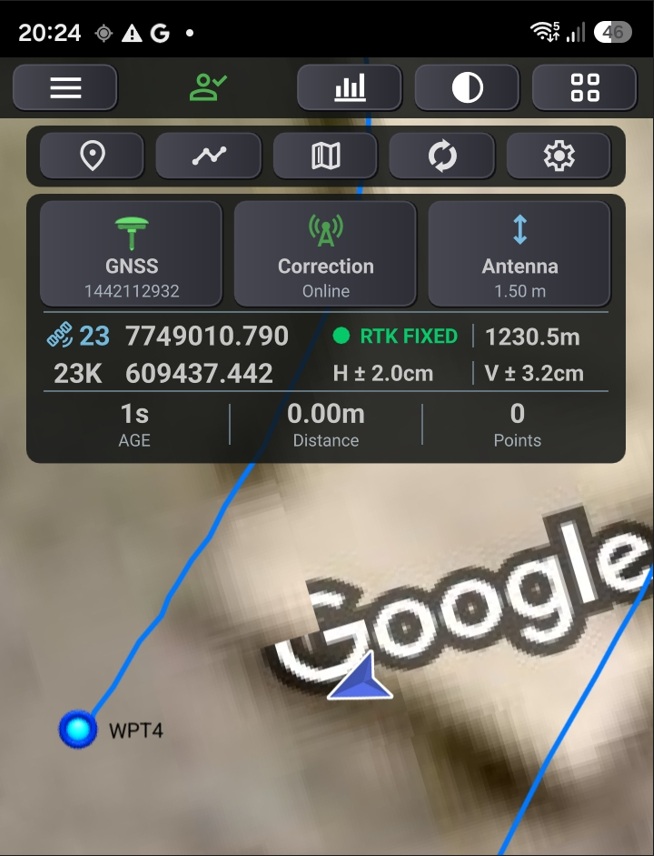
The arrival. We turned the receiver on, paired the Bluetooth, chose the device in GPS TrackMaker and turned on Online Correction. It went to RTK FIXED without any configuration, with 22 satellites and a reported accuracy of 2.5 cm horizontally and 3.7 cm vertically. It needed no firmware, code or command.
The only adjustment. The satellite signal bars came up empty. From the factory, the receiver does not send the satellite list. One tap on Activate Rover, on the Configure receiver screen, fixed it and the setting was saved.
Satellite PPP. We activated PPP from the app and turned off Online Correction. Within a few minutes the panel was showing the PPP label, with no internet at all. It works with the factory firmware.
The base station. We tried to use the SMA25R as a base. The engine accepts the commands, but the correction does not come out over Bluetooth. We wrote to the manufacturer, who answered within a day. The SMA25R Net is rover only, by product definition. We insisted, asking for a firmware option, and the answer was the same. For a base, they pointed to another model of the brand, which we did not test.
Tilt. The tilt sensor is there and is used by the manufacturer’s app. The corrected position does not come in the standard messages the receiver sends, and so far GPS TrackMaker does not use it. Support is planned for future versions of the app.
The iPhone. In October we tested it on iPhone. The device has Bluetooth LE, and that is how the iPhone connects. In November, on iPhone, it reached RTK FIXED with a reported accuracy of 1.6 cm horizontally, receiving corrections from one of our own base stations.
Is it worth it?
| Strengths | Weaknesses |
|---|---|
| It works out of the box. RTK FIXED with no firmware, activation or configuration. | It is the most expensive of the receivers we tested. |
| A finished device, with internal battery, built-in antenna, pole thread and rigid case. | It cannot be a base station, and firmware does not solve that. |
| Unicore UM980 engine, with all constellations. RTK FIXED with a reported accuracy of 1.5 to 2.5 cm horizontally. | The tilt sensor is not used by GPS TrackMaker so far. |
| Satellite PPP, which works without internet. | Part of the price is a surveying app that is not needed with GPS TrackMaker. |
| Available on Amazon. Fast, clear manufacturer support. | IP54 protection, which handles splashes, not heavy rain. No light that indicates RTK. |
The SMA25R Net is a well made product, with a good case and good support. On the surveying market, it is one of the least expensive receivers. The comparison that matters here is a different one, with the other low-cost models we tested.
In that comparison, the price weighs. On the scale of the Approved GNSS Receivers page it is the $$$$$, against $ for the NANO RTK Pro and the AK330. Accuracy in RTK FIXED is of the same order in all three, and the two cheaper ones also work as a base station, which the SMA25R does not. Much of the extra money goes to the surveying app and the tilt sensor. With GPS TrackMaker, neither is used. Tilt sensor support will be implemented soon.
In short, it is a good receiver, but, to use with GPS TrackMaker, we think the price does not pay off. It makes sense for those who want a single device, with built-in battery and antenna, available on Amazon, or for those who need satellite PPP where there is no cell signal.
What you need
| Item | Notes |
|---|---|
| SMA25R Net with the battery charged | It charges through the USB-C port, with the charger from the kit or a power bank. |
| Survey pole | The receiver screws straight onto the pole. The antenna needs to be up high, away from your body, under open sky. |
| Android phone or iPhone with GPS TrackMaker 2.0 or later | On Android (Google Play) and on iPhone (App Store), always over Bluetooth. |
| Internet on the phone | Required to receive corrections over the internet. With satellite PPP, it is not needed. |
| GPS TrackMaker PRO account | Connecting the receiver and using its position is free. Online Correction requires signing in with a PRO account. |
| A correction source | To get down to centimeters, a correction network over the internet or a base station run by your team, set up with another receiver. GPS TrackMaker does not provide the correction. See the options in the RTK article. |
Using the SMA25R Net with GPS TrackMaker
The SMA25R Net is used like any Bluetooth receiver in the app. The full walkthrough of each screen is on the NANO page, and it applies just the same. Here are only the differences for the SMA25R.
Connecting
- Turn the receiver on. It advertises over Bluetooth a ten-digit name, which is the device’s serial number.
- On Android, pair the receiver in the phone’s Bluetooth settings. It does not ask for a PIN. On iPhone, there is no need to pair.
- In the app, open the menu (☰), tap GNSS and the Receiver over Bluetooth card. In the BLUETOOTH DEVICES box, tap the ten-digit name.
- The status card turns green, with the message Receiving GNSS data.
The receiver accepts one phone at a time. If it does not connect, check that it is not connected to another phone or to the manufacturer’s app.
The device has only two lights, power and connection. Neither indicates RTK. You follow the solution type on the app’s panel.
Activate Rover the first time
From the factory, the SMA25R does not send the satellite list. RTK works anyway, but the app’s signal bars stay empty.
Tap Configure receiver. Under SELECT THE EQUIPMENT, the app suggests SMAJAYU SMA25R Net (UM980) from the Bluetooth name. If another one shows up, tap it and choose this one from the list. Then tap Activate Rover. Within a few seconds the app turns on the missing messages and saves the configuration in the receiver (Done. Saved in the receiver). You only need to do this once.
Antenna height
The antenna is internal. According to the manufacturer’s table, its center sits 14.9 cm above the base of the thread. Add that value to the pole length when entering the Antenna height. With a 1.80 m pole, enter 1.949.
Online Correction and RTK
It is the same as with any receiver. Open Online Correction, choose the server and tap Connect. Next to a window, we saw the SMA25R reach RTK FIXED in less than 15 seconds.
In one of the field tests, with a network that picks the station by itself, the receiver stayed in RTK FLOAT for 13 minutes before fixing. The likely cause is that the network switched reference stations along the way, and at each switch the computation starts over. If your network allows it, choose a fixed station near you instead of the automatic mode.
Base Station
It is not available. On the Configure receiver screen, the Activate Base Station button appears dimmed, with the notice Not available.
The UM980 engine is able to generate the base correction, but the device does not deliver it over Bluetooth. It is a restriction of the product, confirmed twice by the manufacturer, and there is no way to undo it from the app.
To set up your own base you need another receiver. The SMA25R can be its rover, and that is how we tested it on iPhone. The Approved GNSS Receivers page shows which models can work as a base.
Tilt
GPS TrackMaker did not use the SMA25R’s tilt sensor at the time of the test. Measure with the pole vertical, as with any other receiver.
Satellite PPP: decimeters without internet
The SMA25R receives a type of correction straight from satellite, through the Galileo HAS service, with no internet and no subscription. In GPS TrackMaker this solution appears with the PPP label. It is not RTK. Accuracy is at the decimeter level and takes a while to settle. It is for places with no cell signal and no base station nearby.
How to activate it
- With the receiver connected, open GNSS and Configure receiver.
- Tap Activate PPP correction. The receiver restarts in the middle of the process, and the app waits for it. It takes about a minute.
- Leave Online Correction off and go to open sky.
- Wait. The panel stays in SINGLE for a few minutes, then shows DGPS and finally PPP.
The configuration is saved in the receiver. To turn it off, tap Deactivate PPP correction.
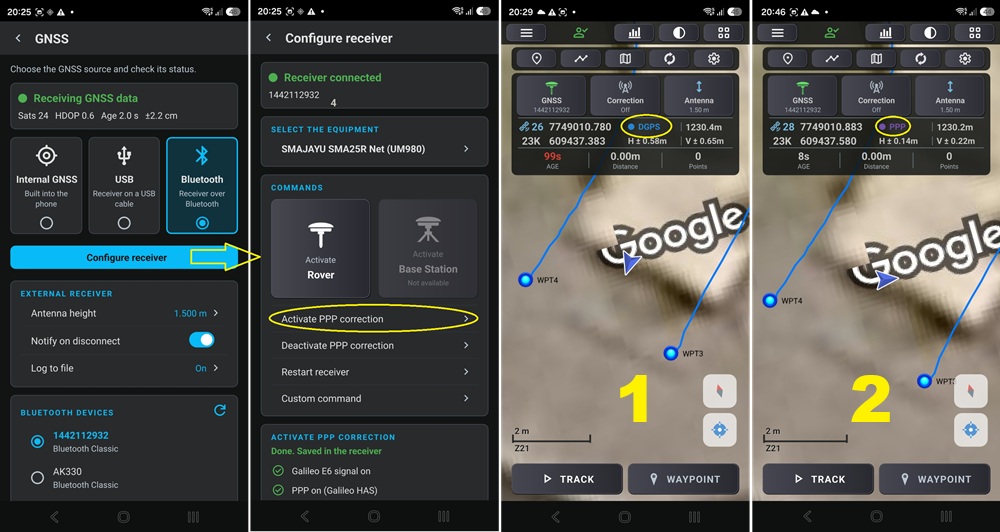
PPP can stay activated together with Online Correction. While corrections are arriving over the internet, RTK takes priority and the panel shows RTK FIXED. If they stop, the receiver switches to PPP within a second, starting from the position it had in RTK.
The receiver also has the BeiDou system’s PPP (B2b), which covers only the Asia-Pacific region. GPS TrackMaker activates Galileo HAS, which is what we tested.
What to expect
We compared PPP with a point measured earlier in RTK FIXED, under open sky, with the receiver stationary:
| Test | Result |
|---|---|
| Time until the PPP label appears, after turning the receiver on | 2 to 7 minutes |
| Error at 25 minutes, from a cold start | 80 cm horizontally and 1 m vertically |
| Error at 62 minutes, from a cold start | 27 cm horizontally and 29 cm vertically |
| Error over 42 minutes, starting from an RTK FIXED | 10 to 15 cm horizontally and up to 33 cm vertically |
| Accuracy the receiver reported during these tests | 4 to 6 cm horizontally |
The last row is the one that calls for attention. In PPP, the accuracy the receiver reports is optimistic. It said 5 cm while the real error was 80 cm. Do not trust the H and V values on the panel while the label is PPP.
The listing mentions 10 cm with PPP. In our tests, from a cold start, we did not reach that value. In practice, count on 25 to 30 cm after about an hour with the receiver stationary under open sky. Before that, the error can come close to 1 meter.
What we measured
| Test | Result |
|---|---|
| RTK FIXED out of the box | Yes, with no configuration, with 22 satellites |
| Accuracy reported by the receiver in RTK FIXED | H ±1.5 to 2.5 cm, V ±3.2 to 3.7 cm |
| Same point measured with two different correction networks | Difference of 1.4 to 2 cm |
| Time to RTK FIXED | Less than 15 seconds next to a window. In one field test, 13 minutes (see Online Correction and RTK). |
| RTK FIXED on iPhone | Yes, with H ±1.6 cm, as the rover of one of our own base stations |
| Bluetooth | More than 30 minutes of continuous logging, one point per second, with no gaps |
| Satellite PPP, from a cold start | 27 cm horizontally after 62 minutes |
| Restarting the receiver from the app | It is back in about 8 seconds, with the configuration kept |
| Base station | Does not work |
The RTK FIXED values are the ones reported by the receiver. With this model we have not yet repeated the tape measure test we did with the AK330.
Common issues
| What you see | Likely cause | What to do |
|---|---|---|
| The receiver does not appear in the app’s list | It was not paired on Android, or it is connected to another phone. | Pair it in the phone’s Bluetooth settings. The name is a ten-digit number and there is no PIN. |
| Empty signal bars | Receiver with the factory messages. | Configure receiver, Activate Rover. |
| After using the manufacturer’s app, the bars disappear or PPP no longer comes in | That app rewrites the receiver’s configuration when it connects. | Activate Rover again and, if you use PPP, Activate PPP correction. |
| Activate Base Station dimmed, with Not available | The SMA25R Net does not work as a base. | Use another receiver as the base. |
| It stays in RTK FLOAT for a long time | Obstructed sky, distant station or the network switching stations. | Go to open sky and choose a fixed station nearby. |
| Online Correction off and the panel does not show PPP | PPP is not activated in the receiver, or it has not come in yet. | Activate PPP correction and wait a few minutes under open sky. |
| In PPP, H and V of a few centimeters | In PPP the receiver reports a better accuracy than the real one. | Count on 25 to 30 cm after about an hour. |
| Point elevations off by about 15 cm | Antenna height entered without the receiver’s 14.9 cm. | Add 0.149 m to the pole length. |
Conclusion
The SMA25R Net was one of the easiest receivers to get working and the best finished among those we tested. It turned on, connected and reached centimeters. The manufacturer answers, the case is professional grade and it is available on Amazon.
What weighs against it is the price. It costs much more than the other models on our list and cannot be a base station. Part of the price goes to the surveying app, which is not needed with GPS TrackMaker, and to the tilt sensor, which the app does not use yet and which is planned for future versions. For those who will use the receiver with GPS TrackMaker, we think the difference does not pay off.
Receivers of similar construction, without the app, cost less than half. We are bringing one of them in for testing and, if it is approved, it will go on the Approved GNSS Receivers page. If the idea is to spend less right away, the NANO RTK Pro works out of the box and also serves as a base station.
Still have questions? Reach us through the contact page.