
GPS TrackMaker PRO 5.2.754
Professional mapping over satellite imagery
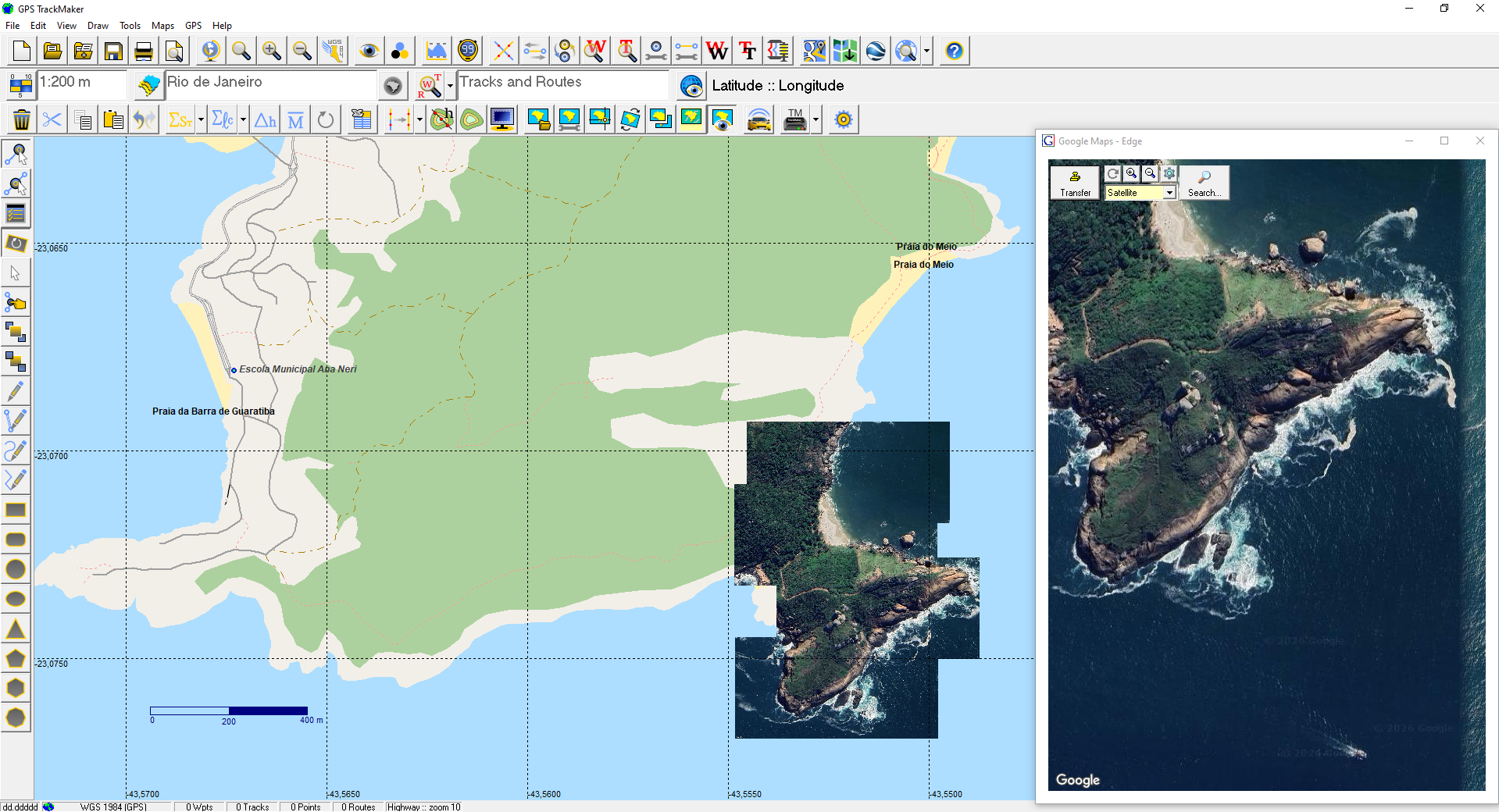
Professional software for creating georeferenced maps from satellite imagery. A direct workflow, without the complexity of traditional GIS.
Capture imagery from Google Maps, edit vector maps from OpenStreetMap, calculate areas and distances with precision, and export to AutoCAD, ArcGIS, QGIS, Excel and Google Earth. Compatible with Windows 10 and 11.
In the field, use the GPS TrackMaker app for Android and iOS. Connected to a low-cost RTK GNSS receiver and a correction source, the app marks points with centimeter accuracy, and the data reaches GPS TrackMaker PRO through web sync.
Suitable for: farmers, ranchers, land surveyors, engineers, forensic experts, agronomists, geologists, topographers, and professionals who work with geographic data.
Specifications
RTK data from the app
- Receives through web sync the waypoints and tracks collected in RTK with the GPS TrackMaker app for Android and iOS
- Each waypoint marked in RTK carries in its comment the solution, the accuracy, the number of satellites and the antenna height at the moment it was marked
- RTK points go into the same area, distance and azimuth calculations and the same exports as any other data
- The connection to the RTK GNSS receiver and to the correction source is made in the app. GPS TrackMaker PRO does not connect directly to RTK receivers
- The correction comes from the user’s own base or from a third-party correction network. GPS TrackMaker does not supply the correction
- Receivers we tested on the Approved GNSS Receivers page
Capture and editing
- Use the GPS TrackMaker app for Android and iOS to collect field data and view maps, synced over the internet
- Extraction of georeferenced images from Google Maps, creating offline mosaics
- Extraction of editable vector maps from OpenStreetMap
- Image rotation for precise calibration
- Image cropping
- Expand Zone function (calibration across two or more UTM zones)
- Rectangular crop for advanced mapping
- Restore original image appearance
Image formats
- GeoTIFF support (georeferenced TIFF)
- DRG file support (Digital Raster Graphic)
- Read and write BMP, JPG, GIF, TIFF, PNG and PCX
Calculations and measurements
- Cartographic area calculation bounded by tracks
- Local topographic area calculation bounded by tracks
- Local topographic distance calculation
- Horizontal projection distance or with elevation correction
- Topographic conversion of GPS data
- Geodetic mean position of waypoints, tracks and routes
- Azimuth, speed and distance table
- Azimuth calculation with hundredth-of-second precision
- UTM scale factor and meridian convergence
Coordinate systems and datums
- Cartographic and topographic plane support
- User-defined datum
- User-defined rectangular grid (User Grid)
- LTM and RTM coordinate systems
Import and export
- AutoCAD — DXF format
- ArcGIS and QGIS — SHP format
- MapInfo — MIF/MID format
- Excel — XLS format (Excel 95)
- dBase IV — DBF format
- Import and export to text editors
- Spreadsheet-style data handling similar to Microsoft Excel
Tracks, waypoints and profiles
- Multiple waypoint styles for detailed maps
- Track merging
- Data rotation
- Elevation profile with advanced functions
- Apply elevations to contour lines
- Create elevation-profile tracks from contour lines
Other
- Print preview
- Accent removal tool
- Compatible with Windows 10 and 11
Supported GPS receivers
TrackMaker (10)
- GPS TrackMaker for Android and iOS
- RTK GNSS receivers, through the GPS TrackMaker app (Approved GNSS Receivers)
- 4G Mini Tracker
- TM Trackers (All)
Garmin (131)
- Dakota 10
- Dakota 20
- Edge 205
- Edge 305
- eMap
- eTrex
- eTrex 10
- eTrex 20
- eTrex 30
- eTrex Chinese
- eTrex European
- eTrex Legend
- eTrex Legend C
- eTrex Legend Color CX
- eTrex Legend T
- eTrex Summit
- eTrex Venture
- eTrex Venture CX
- eTrex Vista
- eTrex Vista C
- eTrex Vista Color CX
- eTrex Vista H
- eTrex Vista HCX
- eTrex Vista T
- Forerunner
- Forerunner 201
- Forerunner 205
- ForeTrex
- Geko 201
- Geko 301
- GNC 250
- GNC 300
- GPS 12
- GPS 12 CX
- GPS 12 Map
- GPS 12 XL Ch
- GPS 12 XL Jap
- GPS 120
- GPS 120 Ch
- GPS 120 XL
- GPS 125
- GPS 126
- GPS 126 Ch
- GPS 128
- GPS 128 Ch
- GPS 12XL
- GPS 150
- GPS 150 XL
- GPS 155
- GPS 162
- GPS 165
- GPS 176
- GPS 176C
- GPS 250
- GPS 250 XL
- GPS 295
- GPS 300 XL
- GPS 38
- GPS 38 Ch
- GPS 38 Jap
- GPS 38XL
- GPS 40
- GPS 40 Ch
- GPS 40XL
- GPS 45
- GPS 45 Ch
- GPS 45XL
- GPS 48
- GPS 55
- GPS 60
- GPS 65
- GPS 72
- GPS 75
- GPS 76
- GPS 76S
- GPS 78
- GPS 78S
- GPS 80
- GPS 89
- GPS 90
- GPS 92
- GPS 95
- GPS 95 AVD
- GPS II
- GPS II Plus
- GPS III
- GPS III Pilot
- GPS III Plus
- GPS MAP 180
- GPS StreetPilot
- GPS V
- GPS V Taiwan
- GPSCOM 190
- GPSCOM170
- GPSMAP 130
- GPSMAP 195
- GPSMAP 205
- GPSMAP 230
- GPSMAP 296
- GPSMAP 60
- GPSMAP 60C
- GPSMAP 60CSX
- GPSMAP 60CX
- GPSMAP 62
- GPSMAP 62s
- GPSMAP 62sc
- GPSMAP 62st
- GPSMAP 76
- GPSMAP 76CSX
- GPSMAP 76CX
- GPSMAP 78
- GPSMAP 78s
- GPSMAP182C
- GPSMAP185
- GPSMAP196
- GPSMAP2006
- GPSMAP276C
- GPSMAP76C/60C/CS
- GPSMAP96
- GPSMAP96C
- Montana 600
- Montana 650
- NavTalk GSM
- Nuvi — All
- Oregon — All
- Quest
- Rino 110
- Rino 120
- SP ColorMap
- Street Pilot C — All
- Street Pilot i — All
Magellan (41)
- ColorTrak
- DLX 10
- eXplorist 100
- eXplorist 200
- eXplorist 300
- eXplorist 400
- eXplorist 500
- eXplorist 600
- FX 324
- GPS 2000
- GPS 2000/OSGB
- GPS 2000XL
- GPS 3000
- GPS 3000XL
- GPS 315
- GPS 320
- GPS 330
- GPS 4000
- GPS 4000XL
- GSC-100
- MAP 410
- Meridian Gold
- Meridian Marine
- Meridian Platinum
- Meridian XL
- MeridianGPS
- MMC/SD cards
- NAV 1200
- NAV 6000
- Patriot
- SkyBlazer
- SkyBlazer LT Map
- SkyBlazer XL
- Skystar – 2Ch
- SkyStar – 2Ch.
- SkyStar 12
- Sportrak
- SporTrak
- Tracker
- TrailBlazer XL
- TrailBlazer XL-Arabic
Other (28)
- Brunton Multi-Navigator GPS
- Lowrance AccuMap
- Lowrance AccuMap 12
- Lowrance AccuMap GPS
- Lowrance AirMap
- Lowrance AirMap 100
- Lowrance Eagle Explorer
- Lowrance Eagle View
- Lowrance Expedition II
- Lowrance GlobalMap
- Lowrance GlobalMap 100
- Lowrance GlobalMap 12
- Lowrance GlobalMap 160
- Lowrance GlobalMap1600
- Lowrance GlobalNav 200
- Lowrance GlobalNav 212
- Lowrance GlobalNav 310
- Lowrance iFinder
- Lowrance LMS 160Map
- Lowrance MMC/SD Cards
- Lowrance UltraMap
- MLR SP24
- MLR FX 312
- MLR FX312 4X4
- MLR FX312 PRO
- MLR FX312 XC
- MLR SP24 XC
- Silva Multi-Navigator GPS
License terms
How it works
GPS TrackMaker PRO works as an annual subscription with online licensing. The current version does not require a hardware key, and the program must be connected to the Internet to run.
After completing the purchase, you receive login, password, and the download link (depending on the payment method, delivery is immediate). Each license can be used on multiple computers, one at a time. The Single Pack covers 1 computer and 1 smartphone at the same time, and the Double Pack covers 2 computers and 2 smartphones. To use your own RTK base, with one phone on the base and another on the rover, you need the Double Pack. Management is handled through the License Management Site.
Renewal
Renewal is not automatic. A few days before the subscription expires, you receive an email with renewal instructions. Even if the email lands in your spam folder, you can access the License Management Site at any time to renew manually.
Refund
To request a refund, contact us within 30 calendar days of purchase. Each case is reviewed individually.